Showing posts with label computer. Show all posts

Tuesday, August 17, 2010

Free Harddisk Cloning Solution

I am sure there are times you need to move all harddisk content over to another disk without the luxury of the time to reinstall.
Here is the free Home-Based solution just by using a <1GB Thumbdrive you can image your harddisk without buying software like Norton Ghost or Acronis.
First download unetbootin, a tool to create Linux Live Thumbdrive boot disk.
Next download EASEUS Disk Copy from EASEUS.
Unzip dc.zip to a location.
Create a bootable thumbdrive by launching unetbootin as shown.


After that plug in your source and destination harddisk, boot from thumbdrive then run disk copy and do a sector by sector imaging!

Wednesday, January 20, 2010

Some Laptop Recommendations

The info below is outdated will "refresh" when i have the time.
If you guys want to buy laptops but don't know anything, don't care about anything. I happen to have a list of "Not so Bad" recommendation (Someone asked me what laptops do I recommend).
Note they are all cheap or rather value for money systems because personally I don't recommend paying a lot for a laptop since they are all powerful enough to perform daily task.
I consider 15" a bit large for a laptop so I will only list 14" at most.

Disclaimer: When I meant Virtualisation in this article I meant Hardware Virtualisation


Dell:

Dell Vostro V13

Why it is great:
Looks good, long battery life, Light and highly portable Alumium Casing like Macbooks (Although I see no point, personally I prefer magnesium casing like HP Probook)

Why it is not so great:
Lousy Intel Graphics.
1 RAM slot only limited expansion
If you need to game look somewhere else otherwise this laptop is actually quite good.

Tips:
Try to look for Dual Core(SU7300) version as Core Solo is slightly underpowered, however this increase the price point so weight your pros and cons.
Only the SU3500 and SU7300 supports Virtualisation.


HP:

HP Probook 4415S

Why it is great:
Look awesome (Design very similar to Macbooks but Black is cooler)
It has a nice rubbery plastic palm rest very ergonomic.
Has decent entry level graphics for gaming Radeon 4200HD.
Decent Mobility.
Virtualisation support.

Why it isn't so great:
AMD Turion II Processor may not be up to par to Intel Low Voltage Processors in terms of batterylife but rather decent processing power.
Uses BroadCom Wireless which isn't so good compared to Atheros

Tips:
Try and get the M5XX Processor +35 dollars but it is Turion instead of Athlon which is more power optimized.


HP Pavilion dv4-2140us
Why it is great:
It is actually the HP equivalent of the Acer Aspire 4540 (No G)
If you hate Acer for whatever reason you can consider this

Why it isn't so great:
It is slightly more expensive than Acer for the same specification.

Acer Aspire 4540G

Why it is great:
Like all Acers this is cheap
Great Graphics Radeon 4570HD the slightly lower end version(4540) comes with Radeon 4200HD.
Looks decent but more like a entertainment laptop instead of a serious look like the Probook.
Support Virtualisation.

Why it isn't so great:
AMD Turion II Processor may not be up to par to Intel Low Voltage Processors in terms of batterylife but rather decent processing power.

Tips:
Try and get the M5XX/M6XX Processor but it is Turion instead of Athlon which is more power optimized.


Acer Timeline

There is a lot of Timeline offering different specification options.
Travelmate Timeline: TravelMate 8X71 (X is the inch of the screen 13(3), 14(4), 15(5))
Aspire Timeline: Aspire X810 (X is the inch of the screen 13(3), 14(4), 15(5))
For Aspire Timeline there is TZ, TG, TZG
G means there is better graphics Radeon 4330HD with switchable Intel 4500MHD graphics.

Why they are great:
Cheap as usual, Light Portable and great batterylife
The TG version has entry level graphics for a bit of gaming.

Why they are not so great:
The TG is slightly costly.

Tips:
Pick the one that fits your needs.

ASUS:

ASUS UL80
Why it is great:
Low Voltage Intel Processor with Nvidia Graphics (You seldom see this combination for a low Price).
It is said to switch graphics automatically according to your needs in Windows conserving more power. How bug-free is this implementation I seriously don't know.

Why it isn't so great:
Some people said the keyboard and casing isn't exactly good(Solid) enough.
Slightly more expensive than Timeline if you are not fond of ATi Graphics you can consider this.

Other Laptops
These are the following laptop with a Generic Intel Processor and Entry Level Nvidia Graphics (G105M/9300M GS/Radeon 4330 HD/Radeon 4200) (Not too special not too bad either)
-Compaq Presario CQ35 (Nvidia)
--Compaq Presario CQ45 (Nvidia)
-Acer Aspire 4736G (Nvidia)
-Dell Inspiron 1440 (ATi)
-Dell Inspiron 1470 (With Low Voltage Processor SU7300)(ATi)
-Toshiba M300 (Nvidia)
-Lenovo IdeaPad Y450 (Above Average Nvidia Graphics solution G130M quite a powerhouse)

The rest of the laptop are
1)Too expensive
2)Has Generic set up Intel graphics + Normal Intel SKU Processor (T6600) (Not good enough for me) normal sized not as portable.
The rest of the value segment is probably:
Intel Mainstream Processor (T6600)
And Intel Graphics 4500MHD
Nothing especially interesting.

If you want to ask my opinion on certain models post below.
I will pick out the pro and cons of the specific model for you to have a better understanding.

Thursday, October 1, 2009

How To Choose What Laptop System To Get?

Basically there are only a few questions you need to ask.
1.Size

How big you need your laptop to be?
Keep in mind size is related to weight, the smaller the laptop the lighter it usually is.
<12.1>
13.1 inches (Mainstream Laptops)
14.1 inches (Mainstream Laptops)
15.1 inches (Mainstream Intensive Gaming Laptops)
16.1 inches (Desktop Replacement)
>16.1 inches (Desktop Replacement)

Usually if you need to move it around 14.1 -15.1 inches would be around the max for mobility.

2.Usage

Processor

Intel

For Intel Processor typically it is easily identified
Intel Core i (Processor Class Number) - (3 Digit SKU Number)(Alphabet 1)(Alphabet 2)

The Processor Class Number is either 3/5 or 7.
3 refers to the low end Processors
5 refers to the mainstream Processors
7 refers to the high end Processors
The 1st Digit SKU Number refers to the instruction set in the Processor.
3X0 means
  1. No Intel® Turbo Boost Technology,
  2. No Intel® Virtualization Technology for Directed I/O (VT-d), 
  3. No Intel® Trusted Execution Technology, 
  4. No AES New Instructions
4X0 means
  1. No Intel® Virtualization Technology for Directed I/O (VT-d), 
  2. No Intel® Trusted Execution Technology, 
  3. No AES New Instructions
5X0 and above
  1. All Instruction Set Supported
The 2nd Digit refers to the different Frequency of the Processor Family

For the alphabet there are a number of fixed Alphabets
M - Mainstream
Q - Quad Core (4 Cores, 8 Threads, No Intel HD Graphics due to high TDP)
X - Xtreme (Unlocked Multiplier)
U - Ultra Low Voltage (Low Frequency + Low Voltage)
L - Low Voltage (Low Voltage only)
E - Embedded (Not Upgradable)
AMD

For AMD Processor it is not as easy.

Generation Griffin
Identifier:
AMD (Model) X(No. of Cores) (SKU Alphabet)-(Frequency Identifier No.)(Odd/Even Last Digit)
  1. Turion refers to high end model
  2. Athlon refers to mainstream model
  3. Sempron refers to low end model
X2 refers to Dual Core

Ultra refers to Total 2MB L2 Cache otherwise 1MB L2 Cache or less.

ZM refers to Turion Processor with 3 Power State
RM refers to Turion Processor with 3 Power State
QL refers to Athlon Processor with 2 Power State
SI refers to Total 512 KB Cache with 2 Power State
Frequency Identifier No. starts from 4X to 8X.
  1. RM-70 starts from 2GHZ (Every 2 increase Frequency Increase by 100MHZ ) Odd Last Digit refers to an increase in HyperTransport Frequency from the Even Digit SKU  
  2. RM-80 starts from 2.1GHZ (Every 2 increase Frequency Increase by 100MHZ ) Odd Last Digit refers to an increase in HyperTransport Frequency from the Even Digit SKU  
  3. V refers to Low Voltage Processor
Generation Caspian
Identifier:
AMD (Model) (Generation II) Ultra (No. of Cores) (Type Alphabet) (3 Digit SKU No.)
  1. Turion refers to high end model
  2. Athlon refers to mainstream model
  3. Sempron refers to low end model
Generation II refer to K10 Architecture

Ultra refers to Total 2MB L2 Cache otherwise 1MB L2 Cache or less.

Type Alphabet
  1. M refers to Mainstream
  2. L refers to Low Voltage
3 Digit SKU
6XX refers to Turion Ultra Series Starting from 2.4 GHZ, every increment in 20 increase by 100MHZ with 5 Power States
5XX refers to Turion Series Starting from 2.2 GHZ, every increment in 20 increase by 100MHZ with 5 Power States
3XX refers to Athlon Series Starting from 2.0 GHZ, every increment in 20 increase by 100MHZ with 3 Power States
Note Starting Frequency of L Series differ from M Series

Generation Champlain
 
The Generation Caspian adds Quad Core Mobile Processor to the market.

Identifier: X NNN
X is either X for Black Edition (Unlocked Multiplier 45 Watt TDP ), N for MainStream (35 Watt TDP) & P for MainStream Lower Power Consumption (25 Watt TDP), V for Low End (25 TDP Single Core).

1st Digit refers to SKU
9 - Quad Core with 21.3GB/s HyperTransport
8 - Triple Core with 21.3GB/s HyperTransport
6 - Dual Core with 21.3GB/s HyperTransport
5 - Dual Core with 17GB/s HyperTransport
3 - Dual Core with 64bit Floating Point Unit (I suspect it is the old Caspian Refresh) (All the new Champlain should have 128Bit Floating Point Units) 17GB/s HyperTransport
1 - Single Core with 64bit Floating Point Unit

All Champlain Generation has 0.5 MB L2 Cache per CPU Core.

Graphics (For Gaming GPU > CPU)

For occasional gaming get at least some decent graphics from Nvidia, ATi.
For Intel Graphics if you must at least go for 3150,4500MHD or the new Intel HD Graphics.
They have Video Codec Decoding Abilties for Adobe Flash 10.1.
For ATi any Radeon HD will do, DO NOT go for Radeon Xpress they are obselete.
For Nvidia, go for anything below 8000 Series. 7000 series are obselete.
Both Nvidia 7000 Series and Radeon Xpress do not support GPU computing and DirectX 10
Use Notebookcheck as a rough guide for gaming performance.
Class 3, Class 2, Class 1 are suitable for occasional gaming.

For more intensive gaming consider getting Class 2 and Class 1 Graphics however they are most available only on 14.1/15.1 inch and above laptops.
Reason being more powerful graphics requires more powerful fansink these contributes to size hence usually they can only be found on 14.1 inch and above systems.

RAM
I don't really bother as it is very easy and cheap to upgrade laptop RAM.
You get more cost saving upgrading RAM yourself than buying a high RAM laptop.

Harddisk
Size is of no concern as they come with at least 120GB and that is more than sufficient.

Edit:
With regards to how good a laptop is in terms of quality you have to look at the design layout.
1) Google the motherboard prints of the particular laptop
2) Heatsink size must be sufficiently large enough particularly for AMD Processor Laptops and those with Nvidia/ATi GPU, larger mass allows higher heat capacity so temperature will not be too high.
The GPU, CPU and Northbridge must not be too close to each other.

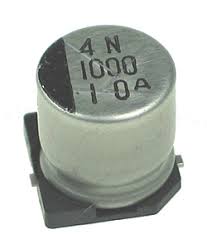
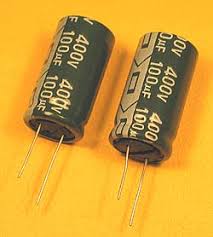
3) The capacitors must be of high quality

High Quality Capacitor
Lower Quality Capacitor

Sunday, May 17, 2009

PC Troubleshooting Advice


Post Your Computer Related Problems here

Although sometimes I might not be able to solve your issue I can probably point you in the right direction.

FAQ:

My laptop is hot even when not doing anything:

First Download and Run
HWMonitor to check if it is really hot internally.
Also a hot laptop can result in sluggish gaming performance as the computer detect high internal temperature and attempts to reduce performance to reduce the temperature increase.

Hot CPU/
GPU Possible Solutions:
  • Download Acer Fan Control and decrease the temperature for the Fan to Activate so the fan will spin more often to bring down the temperatures.
  • For advance users
  1. If you have sent it for repairs open it up and replace the thermal paste using a better brand like Arctic MX2 the technician probably didn't replace the thermal paste when they dissembled it.
  2. Replace the default thermal pads and thermal paste to a high quality type such as Arctic Cooling MX-2 or Arctic Silver 5 after dissembling the laptop.
  3. Run Acer Fan Control Utility while gaming.
  4. Tear away the air filter at the bottom of the laptop to allow better air flow (I did this)
  5. UnderVolt your Processor

Hot
GPU only Possible Solution:
Acer Aspire 4530WebCam shows nothing:

WebCam solution
  • Use the Bison AP Driver the SuYin one is really problematic and the Bison Driver Work on the WebCams


Driver Error Messages:

Possible Solutions:
  • Search and Update Display Drivers (Check What Graphics Card you possess)
  1. For Nvidia GFX card use Nvidia Driver or use this Universal Recent Nvidia Driver don't worry about stability as Nvidia Drivers are always very stable even the Beta Ones
Enhance Your Laptop Experience:
Encounter Weird Laptop Behaviour:

Hardware Reset:
  • Remove all power sources including Battery and AC Adapter.
  • Press and Hold Power Button for 60 Seconds.
  • Turn on Computer.

Possible Solutions:
PLEASE FLASH YOUR BIOS ONLY WHEN YOU NEED THE FIX, DO NOT HAPPILY FLASH WHEN YOU LIKE IT ACCIDENTS CAN OCCUR.
Need to Recover Preloaded Acer Disk Image:
  • Try to recover it first by holding Down Alt-F12 on Boot (With D2D Recovery Enabled in BIOS (F2)) if it doesn't work follow this
I installed Vista myself but get a Blue Screen of Death if I selected AHCI Mode in BIOS
I want to install Windows Xp in AHCI mode but Windows Xp cannot detect Disk Driver when BIOS is in AHCI mode
Solution
If you encounter Blue Screen Of Death, note the error messages + Check the Event Viewer logs and post the offending files below.If the BSOD occurs randomly it can be due to damaged RAM.
Run memtest86 to test for faulty RAM.(Press F8 in Vista to select Memtest86 test)

Wireless Not Detected Properly.
  • Make sure you install the launch manager with the wireless driver.
  • The launch manager switch is tied to the wireless card operation.

Saturday, May 9, 2009

Windows 7 Feature Check

Here is a software to check the capabilities of your System with Windows 7 
From http://www.grc.com/
The name is Securable

The first section shows you what Operating System bit you can run on you computer.
  • If you have 64bit appearing you can run both 64bit and 32bit Windows 7
  • If you have 32bit appearing you can only run 32bit Windows 7
The second section check if the processor support Hardware DEP.
  • It checks if your Processor support hardware data flagging function to prevent buffer overrun to prevent malware exploits.
The third section checks if it can support the hardware virtualisation mode in Windos 7
  • VT support check if your Processor can support Windows Xp Virtualisation in Windows 7