There are many ways to rip the DSDT out of the laptop BIOS.
If there is a BIOS editor it is possible to rip out the .AML file.
However below is an easy way to obtain the DSDT AML file.
First download and install a powerful system BIOS viewing utility called RW-Everything.
Next launch the program.
Click the "ACPI" picture menu button just below the menu bar.
It will say building DSDT and you have to wait for a while.
Once it is ready, Click on the DSDT Tab and press Save as Binary (The Picture of the Floppy Disk with a "bin" word on it or Shift + F2)
Name it as DSDT.AML
This will be the AML file you will decompile to readable text by a ASL Compiler.
If you want me to check it you can upload it on a file sharing site (please upload it on a easy to download site like mediafire etc no rapidshare please) I will check the DSDT syntax.
Showing posts with label modified. Show all posts
Showing posts with label modified. Show all posts
Saturday, November 7, 2009

Wednesday, September 30, 2009
Some Interesting Modding Ideas
I modded my Aspire 4530 AGAIN to control resultant temperature.
Below are some ideas and pictures.


Another mod idea

This time a black anodized Aluminium heat sink (Can be found in any hardware store) is added to increase the mass.
I had to cut and file it to size.
On the plus side it had thermal adhesive tape under it which makes attaching it an easy task.

Below are some ideas and pictures.


Another mod idea

This time a black anodized Aluminium heat sink (Can be found in any hardware store) is added to increase the mass.
I had to cut and file it to size.
On the plus side it had thermal adhesive tape under it which makes attaching it an easy task.

Wednesday, July 1, 2009
Changing the BackUp ShortCut Key on Acer Timeline
The follow is the Registry Entry for Acer Aspire Timeline.
I already modified this key to point to Windows Media Player.
I already modified this key to point to Windows Media Player.
Windows Registry Editor Version 5.00If you want it to point to other programs, simply
[HKEY_LOCAL_MACHINE\SOFTWARE\Inventec\LManager\Settings\Buttons\Backup]
"Command"="wmplayer.exe"
"Command Type"="1"
"Label"="Windows Media Player"
"Remote Code"="C008"
"Description"=""Windows Media Player"
"Configable"="1"
"Show OSD Only for Legacy"="0"
- copy and paste onto notepad
- Change "wmplayer.exe" to something else the reason I don't use the full path is because wmplayer is in C:\Windows and the shortcut can automatically find anything in C:\Windows.
- If the program is in Program Files you have to use the full path eg."C:\Program Files\XXX\XXX.exe"
- Change the Label and description (although it doesn't work as in display the word Windows Media Player when you click it)
- Save as backup.reg
- Double Click then Confirm and you are done.
Saturday, February 28, 2009
How to Use Modded Drivers for Atheros Wireless
OK I guess everyone must be thinking isn't the Microsoft Drivers for Atheros Good Enough
I guess posting a screenshot will change your minds
Take a look at the modded driver options below
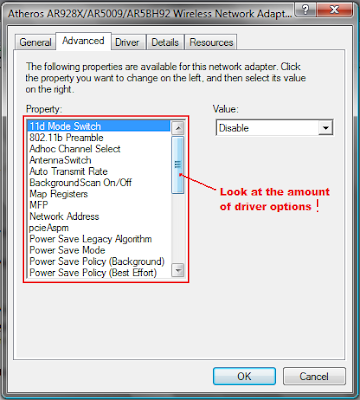 To install this driver
Go to this website
Find the corresponding driver for your operating system
Download and extract to your folder
Next Go to the familar>> Control Panel>> System>> HardWare>> Device Manager
Right click & uninstall the device driver repeatedly for the atheros network adapter until it no longer auto install the Microsoft Driver as shown below
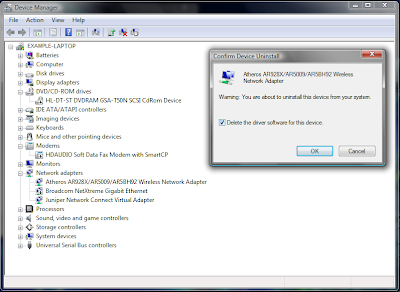 For Windows Vista remember to check delete the driver software for the device
Then right click on the unidentified Network Adapter and browse to the folder you extracted the modded driver to install it
Another more convenient way is to
Finally you will be able to enjoy the new driver options !!
If you are a wireless expert you will certainly like the new additional settings
Also LaptopVideo2go claim there will be a performance boost with this driver
I guess posting a screenshot will change your minds
Take a look at the modded driver options below
 To install this driver
Go to this website
Find the corresponding driver for your operating system
Download and extract to your folder
Next Go to the familar>> Control Panel>> System>> HardWare>> Device Manager
Right click & uninstall the device driver repeatedly for the atheros network adapter until it no longer auto install the Microsoft Driver as shown below
 For Windows Vista remember to check delete the driver software for the device
Then right click on the unidentified Network Adapter and browse to the folder you extracted the modded driver to install it
Another more convenient way is to
- Right Click the adapter
- Choose "Update driver"
- Choose "Browse my Computer for driver software"
- Choose "Let me pick from a list of device driver on my computer"
- Choose "Have Disk"
- Browse to the extracted folder containing the driver and choose the "netathrx.inf"
- Select OK and you are done
Finally you will be able to enjoy the new driver options !!
If you are a wireless expert you will certainly like the new additional settings
Also LaptopVideo2go claim there will be a performance boost with this driver
Subscribe to:
Posts (Atom)