Basically there are only a few questions you need to ask.
1.Size
How big you need your laptop to be?
Keep in mind size is related to weight, the smaller the laptop the lighter it usually is.
<12.1>
13.1 inches (Mainstream Laptops)14.1 inches (Mainstream Laptops)
15.1 inches (Mainstream Intensive Gaming Laptops)
16.1 inches (Desktop Replacement)
>16.1 inches (Desktop Replacement)
Usually if you need to move it around 14.1 -15.1 inches would be around the max for mobility.
2.Usage
Processor
Intel
For Intel Processor typically it is easily identified
Intel Core i (Processor Class Number) - (3 Digit SKU Number)(Alphabet 1)(Alphabet 2)
The Processor Class Number is either 3/5 or 7.
3 refers to the low end ProcessorsThe 1st Digit SKU Number refers to the instruction set in the Processor.
5 refers to the mainstream Processors
7 refers to the high end Processors
3X0 means
- No Intel® Turbo Boost Technology,
- No Intel® Virtualization Technology for Directed I/O (VT-d),
- No Intel® Trusted Execution Technology,
- No AES New Instructions
4X0 means
- No Intel® Virtualization Technology for Directed I/O (VT-d),
- No Intel® Trusted Execution Technology,
- No AES New Instructions
5X0 and above
The 2nd Digit refers to the different Frequency of the Processor Family
- All Instruction Set Supported
For the alphabet there are a number of fixed Alphabets
M - MainstreamAMD
Q - Quad Core (4 Cores, 8 Threads, No Intel HD Graphics due to high TDP)
X - Xtreme (Unlocked Multiplier)
U - Ultra Low Voltage (Low Frequency + Low Voltage)
L - Low Voltage (Low Voltage only)
E - Embedded (Not Upgradable)
For AMD Processor it is not as easy.
Generation Griffin
Identifier:AMD (Model) X(No. of Cores) (SKU Alphabet)-(Frequency Identifier No.)(Odd/Even Last Digit)
X2 refers to Dual Core
- Turion refers to high end model
- Athlon refers to mainstream model
- Sempron refers to low end model
Ultra refers to Total 2MB L2 Cache otherwise 1MB L2 Cache or less.
ZM refers to Turion Processor with 3 Power State
RM refers to Turion Processor with 3 Power State
QL refers to Athlon Processor with 2 Power State
SI refers to Total 512 KB Cache with 2 Power State
| Frequency Identifier No. starts from 4X to 8X. |
- RM-70 starts from 2GHZ (Every 2 increase Frequency Increase by 100MHZ ) Odd Last Digit refers to an increase in HyperTransport Frequency from the Even Digit SKU
- RM-80 starts from 2.1GHZ (Every 2 increase Frequency Increase by 100MHZ ) Odd Last Digit refers to an increase in HyperTransport Frequency from the Even Digit SKU
- V refers to Low Voltage Processor
Generation Caspian
Identifier:AMD (Model) (Generation II) Ultra (No. of Cores) (Type Alphabet) (3 Digit SKU No.)
Generation II refer to K10 Architecture
- Turion refers to high end model
- Athlon refers to mainstream model
- Sempron refers to low end model
Ultra refers to Total 2MB L2 Cache otherwise 1MB L2 Cache or less.
Type Alphabet
- M refers to Mainstream
- L refers to Low Voltage
6XX refers to Turion Ultra Series Starting from 2.4 GHZ, every increment in 20 increase by 100MHZ with 5 Power StatesNote Starting Frequency of L Series differ from M Series
5XX refers to Turion Series Starting from 2.2 GHZ, every increment in 20 increase by 100MHZ with 5 Power States
3XX refers to Athlon Series Starting from 2.0 GHZ, every increment in 20 increase by 100MHZ with 3 Power States
Generation Champlain
Identifier: X NNN
X is either X for Black Edition (Unlocked Multiplier 45 Watt TDP ), N for MainStream (35 Watt TDP) & P for MainStream Lower Power Consumption (25 Watt TDP), V for Low End (25 TDP Single Core).
1st Digit refers to SKU
9 - Quad Core with 21.3GB/s HyperTransport
8 - Triple Core with 21.3GB/s HyperTransport
6 - Dual Core with 21.3GB/s HyperTransport
5 - Dual Core with 17GB/s HyperTransport
3 - Dual Core with 64bit Floating Point Unit (I suspect it is the old Caspian Refresh) (All the new Champlain should have 128Bit Floating Point Units) 17GB/s HyperTransport
1 - Single Core with 64bit Floating Point Unit
All Champlain Generation has 0.5 MB L2 Cache per CPU Core.
Graphics (For Gaming GPU > CPU)
For occasional gaming get at least some decent graphics from Nvidia, ATi.
For Intel Graphics if you must at least go for 3150,4500MHD or the new Intel HD Graphics.
They have Video Codec Decoding Abilties for Adobe Flash 10.1.
They have Video Codec Decoding Abilties for Adobe Flash 10.1.
For ATi any Radeon HD will do, DO NOT go for Radeon Xpress they are obselete.
For Nvidia, go for anything below 8000 Series. 7000 series are obselete.
Both Nvidia 7000 Series and Radeon Xpress do not support GPU computing and DirectX 10
Use Notebookcheck as a rough guide for gaming performance.
Class 3, Class 2, Class 1 are suitable for occasional gaming.
For more intensive gaming consider getting Class 2 and Class 1 Graphics however they are most available only on 14.1/15.1 inch and above laptops.
Reason being more powerful graphics requires more powerful fansink these contributes to size hence usually they can only be found on 14.1 inch and above systems.
RAM
I don't really bother as it is very easy and cheap to upgrade laptop RAM.
You get more cost saving upgrading RAM yourself than buying a high RAM laptop.
Harddisk
Size is of no concern as they come with at least 120GB and that is more than sufficient.
Edit:
With regards to how good a laptop is in terms of quality you have to look at the design layout.
1) Google the motherboard prints of the particular laptop
2) Heatsink size must be sufficiently large enough particularly for AMD Processor Laptops and those with Nvidia/ATi GPU, larger mass allows higher heat capacity so temperature will not be too high.
The GPU, CPU and Northbridge must not be too close to each other.
3) The capacitors must be of high quality
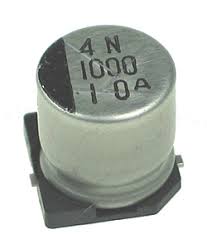 High Quality Capacitor
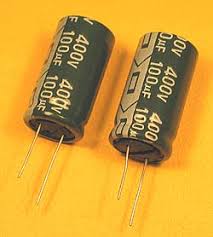 Lower Quality Capacitor
Edit:
With regards to how good a laptop is in terms of quality you have to look at the design layout.
1) Google the motherboard prints of the particular laptop
2) Heatsink size must be sufficiently large enough particularly for AMD Processor Laptops and those with Nvidia/ATi GPU, larger mass allows higher heat capacity so temperature will not be too high.
The GPU, CPU and Northbridge must not be too close to each other.
3) The capacitors must be of high quality
High Quality CapacitorLower Quality Capacitor


